My first homelab

Intro
Around December 2025, I was in the market for a new laptop. My current laptop was alright, my main issue was the relatively small SSD and outdated cpu. Still, it had 16gb of ddr4. Around that same time, I had began doing research into homelabs, and self hosting different services. When Christmas came around and I had a new laptop, instead of retiring the old laptop and letting it collect dust, I opted to re-purpose it into a homelab!
When I began this project, I did not have a concrete plan. However, I did have a starting goal of setting up a minecraft server, and a self-hosted markdown editor. Since I wanted multiple services running, and planned to add more in the future, I wanted to install a type 1 bare-metal hypervisor on the laptop. The hypervisor I chose was Proxmox.
Hardware
The specifications for my laptop turned homelab are as follows:
AMD Ryzen 7 5700U 16gb DDR4 256gb
Although not typical hardware for this application, this was a way for me to dip my toes in the water.
Installing proxmox
To install proxmox on my laptop, I first downloaded the ISO from the official proxmox website, and flashed it onto a usb stick with Rufus.
Before continuing, I went through everything on my laptop and backed up all important data to an external ssd. Once that was done, I plugged in the USB, booted into the BIOS, and selected to boot from the usb. The proxmox installation was graphical and straight forward. It allowed me to specifiy my gateway IP, and the static IP for proxmox. After installation was complete, I connected to the web interface by entering the static IP into my browser and specifying the correct port.
Remote Access via tailscale tunnel
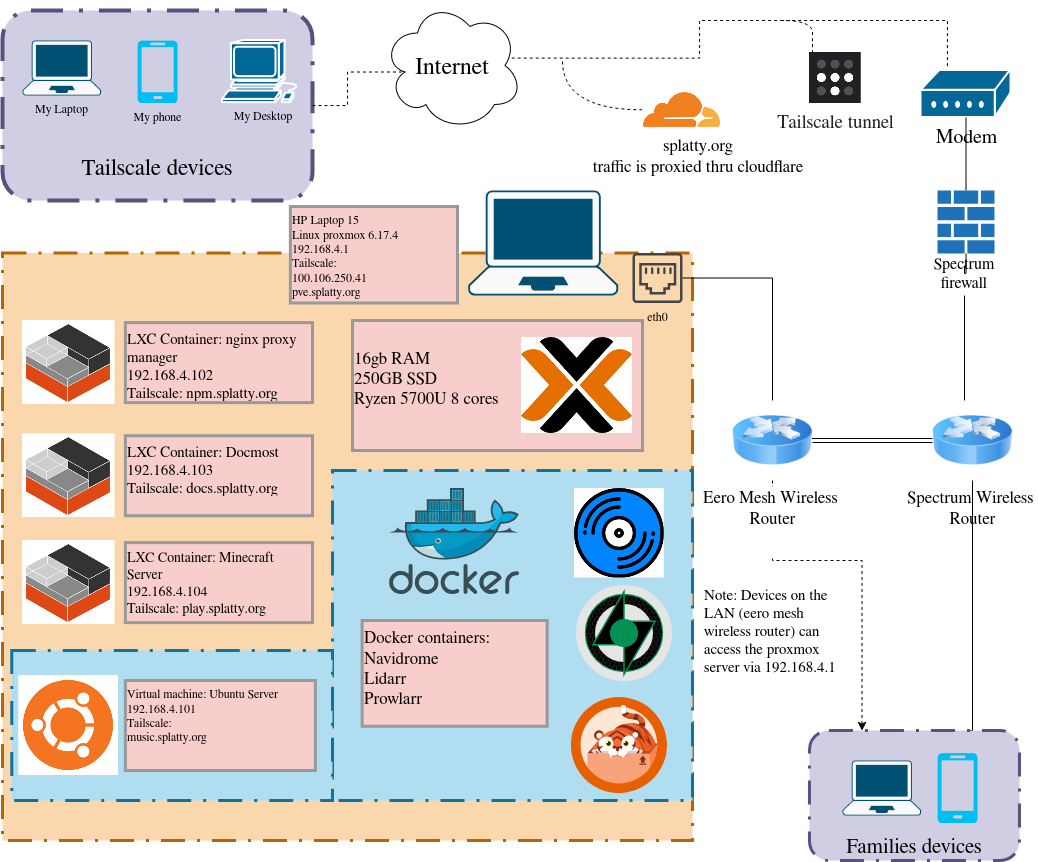
An important aspect of any server is how you access it. I chose to not expose any ports to the open internet, as this would be a dangerous thing to do for a beginner. Instead, I went with tailscale. Tailscale allowed me to setup a tunnel to my server, allowing secure remote access.
Organization and network design
The next step in the process was planning out how everything would be organized. The services I wanted were as follows: A minecraft server, Docmost, nginx proxy manager, and navidrome.
For the first 3, I used pve containers, and deployed them using scripts found on https://community-scripts.org. The minecraft server, and docmost worked right out of the box, but nginx proxy manager required some configuring. The purpose of this service was to allow connection through dns, but only on my local network. For example, docs.splatty.org would resolve to docmost, and play.splatty.org would resolve to the minecraft server. I had to learn about dns records, how to assign my own ssl certificates, and do some configuring on the cloudflare portal. But after all that, it was functioning properly.
Navidrome was a bit more involved. Instead of using a pre-made script, I wanted to manually install the service using docker. Although the pre-made scripts were convenient, I felt that I was missing out on a valuable opportunity by taking the 'easy way'.
The network design phase was quite simple. I wanted to plan out how I would lay out future additions to the server. The design I used was quite simple, Proxmox was on 192.168.4.1, the minecraft server was on 192.168.4.101, nginx proxy manager was on 192.168.4.102, etc. This allowed addressable space to be available for an ample amount of future needs. Below is a diagram that shows how my network was setup.
Conclusion
This was an incredibly rewarding project that not only let me setup some cool self hosted services, but also taught me a lot about networking in the process. Through every roadblock and solution I encountered, I gained a little bit more knowledge. This is a project that I would recommend to anyone in IT. It teaches you fundamental information about networking that will broaden your understanding of how this technology works.
As I am writing this, I currently have plans on upgrading and transferring these services to a proper server that I acquired at an estate sale. I am having some hardware issues with it at the moment, so it may be a long while until I get it operational.